Hoverwatch Android Keylogger is a complete mobile monitoring solution that records keystrokes, monitors apps, captures GPS locations on a map, and takes camera snapshots when the phone is unlocked. Designed for parents who want to know where their children are and what they do on their phones — installed on your child’s device with their awareness. Sign up free.
Look after your kids by monitoring their Android phones
Protect your kids while they are away! With Hoverwatch Android Keylogger, you’ll always know where your kids are. See where they are on the map, see who they call and text, and stay aware of what they are up to with Hoverwatch.
Running on your child’s phone with their awareness, Hoverwatch android keylogger monitors what matters. The tool locates their phone on the map, saves calls and SMS messages they send and receive, and reports back to you periodically. No matter where your kids are, if there is a Wi-Fi or mobile data connection available, you’ll know they’re safe in real time! Hoverwatch is built for visible, disclosed parental monitoring — your child should know the app is installed.
Used for Protection
Hoverwatch is designed to help you protect your kids, and to help your kids protect their Android phones from theft or loss. The phone will report back to the server every once in a while. With these periodic reports, you’ll be able to easily locate your kids on the map and see exactly on the map where they’ve been spending their time during the last day, week or month. The very same tracking feature can come in handy if the phone gets lost or stolen, helping you pinpoint its location and map the “new owner’s” whereabouts. Unlike many other solutions, Hoverwatch works regardless of whether the phone is locked or not, helping you track the device you own even if it’s never unlocked.
Advanced GPS Mapping
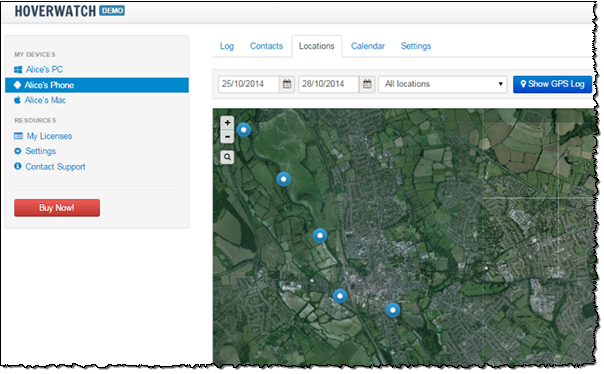
Unlike other solutions, Hoverwatch stores the location of the phone (as defined by the phone’s GPS receiver) every time your kids make a call, launch an app or send an SMS. You’ll know exactly what they did and where they did it. Supporting OpenStreetMap and Google Maps in Roadmap and Satellite modes, Hoverwatch draws a route on the map to let you know exactly where your kids are and what they are (or were) doing there.
The Complete Tracking Solution for Android
Track your kids location on the map, monitor their calls and messages with an all-in-one phone monitoring solution! Hoverwatch installs on your child’s phone and runs quietly ever after – no touching or tweaking required. Hoverwatch reports automatically to a central location, allowing you to access information about your kids location and their phone usage by simply logging in to your account – from anywhere in the world!
Hoverwatch keeps information about incoming and outgoing calls, text, Facebook, Whatsapp, Viber messages, records phone calls and sends periodic reports about the phone’s GPS location. In addition, the tool can be configured to take a snap of your child’s face every time the phone is unlocked with the phone’s frontal camera. Call recording may require the consent of everyone on the call, depending on the laws where you live.
Theft Protection for Your Android Devices
Protect your device against theft or loss! In addition to tracking your phone in background and reporting its exact coordinates on the map, Hoverwatch can take snap photos with the phone’s front camera every time the device is unlocked. This feature comes in handy when the phone is lost or stolen and you just want to know who has it.
Who is it for?
Hoverwatch is designed for families and parents concerned about their kids’ safety. Running quietly in the background — with your child aware it’s installed — helps parents stay aware and ready to help. Continuous monitoring and periodic reporting to a central location enables access to real-time and historic GPS locations from anywhere in the world. The tracking ability along with stored location information helps find your child’s phone on the map in case it gets lost or stolen, while the ability to snap photos of anyone unlocking the device helps identify the new “owner”.
What’s Recorded (and Why)
Hoverwatch records and transmits certain types of data required to monitor phone usage on your child’s device. The following types of information are recorded and sent to the central server:
-
GPS location Geolocation information is continuously recorded and periodically transmitted to the central server. The last 30 days of GPS data are stored, enabling easy reconstruction of your child’s whereabouts at any point of time during the past month.
-
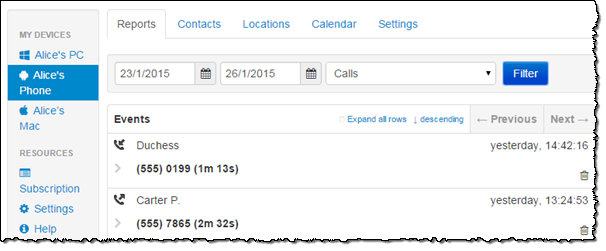
Information about incoming and outgoing calls Data about phone calls made and received is recorded; the other party is identified by phone number and address book information. The data is transmitted and stored on the server.
-
Conversation recording Hoverwatch can record incoming and outgoing calls, helping you get insight not just into who your kids speak with, but what they’ve been talking about. Recording calls may require the consent of everyone on the call, depending on the laws where you live.
-
SMS messages sent and received The full content and accompanying information about text are recorded, transmitted and stored on the central server.
-
Unlock snapshots If configured, the tool can make snapshots of the person unlocking the phone. This helps confirm who used the phone at any particular moment, and helps identify the new “owner” of the device if the phone is lost or stolen.
Free to Try
You don’t have to purchase anything to try Hoverwatch. Just download and install the tool on your kids’ Android devices — with their awareness — and enjoy the free evaluation period of 3 days.


